Your meter does the typing
Pair a Bluetooth meter once. Every new reading comes across with its time, no copying numbers by hand.
Sugar Pulse copies readings straight from your Bluetooth glucose meter, shows at a glance whether you are low, in range or high, and turns weeks of numbers into patterns you and your doctor can use.

Sugar Pulse is built for real people: busy days, patchy internet, older eyes and family doctors. It keeps the important things big, clear and kind.
Pair a Bluetooth meter once. Every new reading comes across with its time, no copying numbers by hand.
Every reading shows a colour, a word and an arrow, so you always know if you're low, in range or high.
Your records live on your phone. Log, review and make reports anywhere, signal or not.
Make a tidy PDF report for any dates and share it on WhatsApp, by email or print it.
Choose your meter's brand and Sugar Pulse walks you through pairing, step by step. After that, one tap on Sync now copies every new reading, with the exact time it was taken.


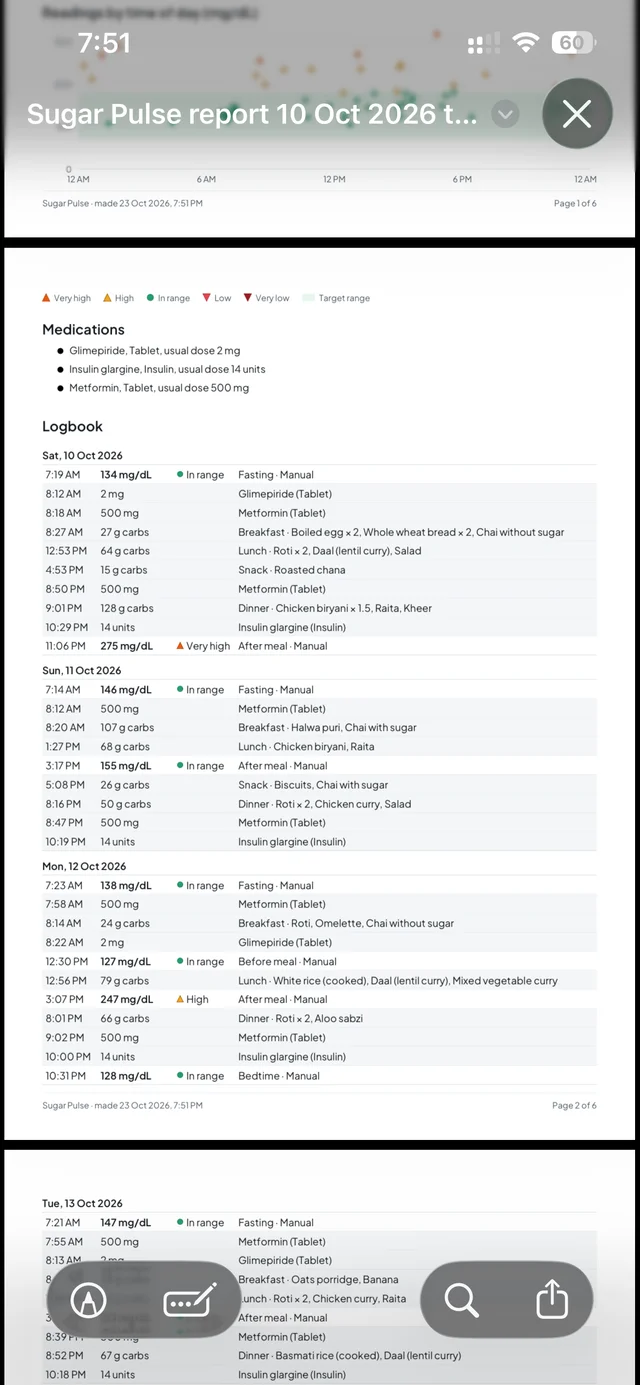
Your latest reading sits big and bold on Home, with the last 24 hours on a chart and your target range shaded behind it. The logbook keeps readings, meals and medicine doses together, day by day.
The ranges are yours. Start with the common 70–180 mg/dL and change them to whatever your doctor suggests.


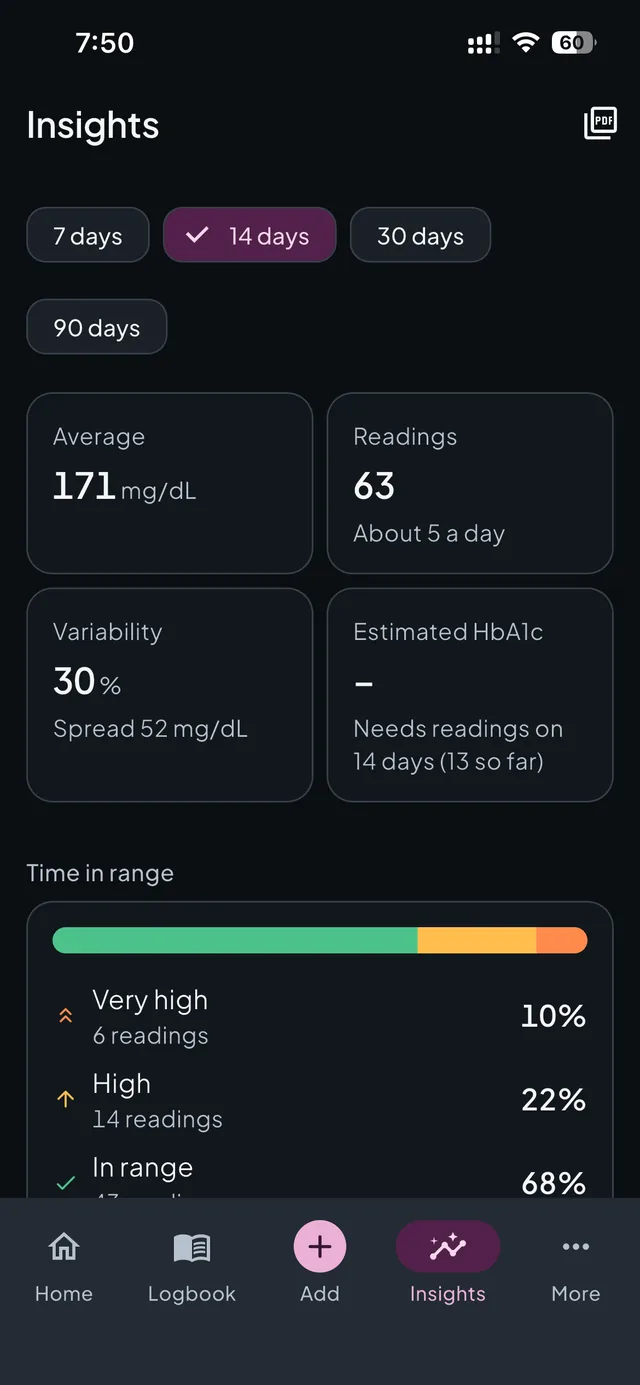
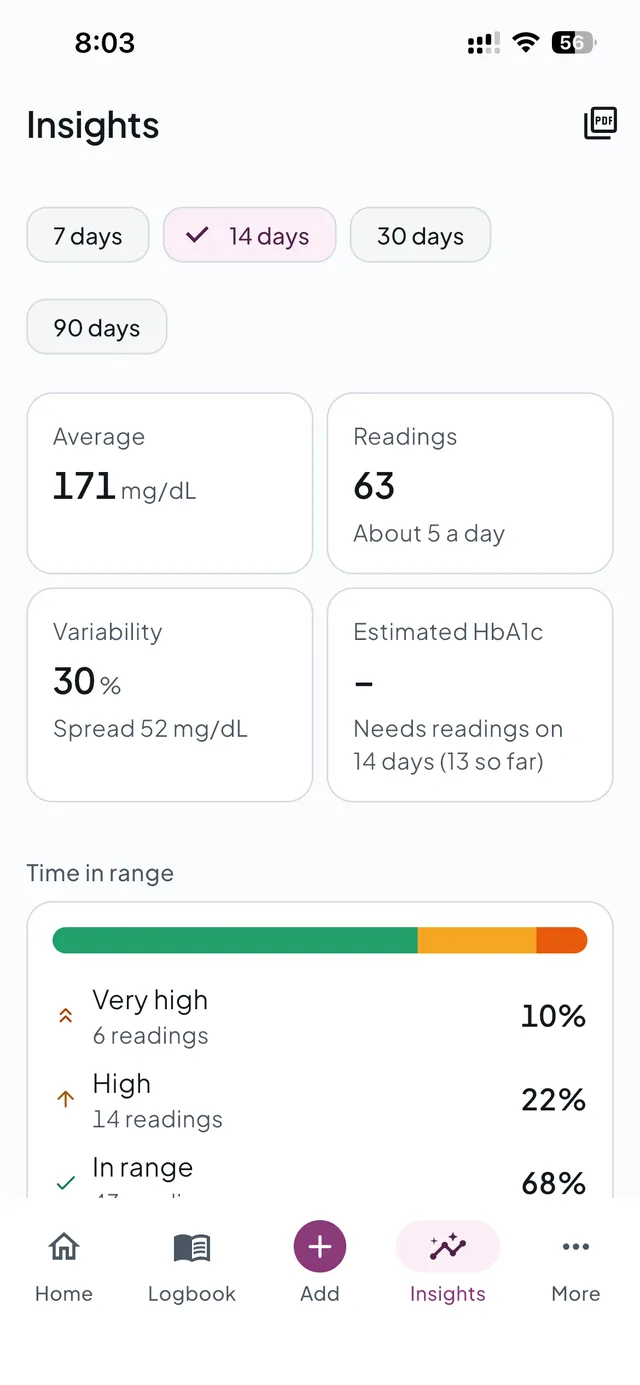
Look back over 7, 14, 30 or 90 days and see what your readings are really telling you, explained in plain words.
Estimated HbA1c appears once you have readings on 14 different days, and it is always labelled as an estimate.


Sugar Pulse knows the food on your plate: over 160 common foods from Pakistan, India, Bangladesh, Sri Lanka and Nepal, with their everyday names. Pick what you ate and the carbs add up as you go.
No calorie counting and no diet rules. Just carbs, so you can learn what works for you.


Set reminders for sugar checks, medicines and meals, every day, on chosen weekdays or every few hours. When a medicine reminder pops up, tap Taken and the dose is logged, even if the app is closed.
Sugar Pulse records the doses you take. It never suggests a dose: that's for you and your doctor.


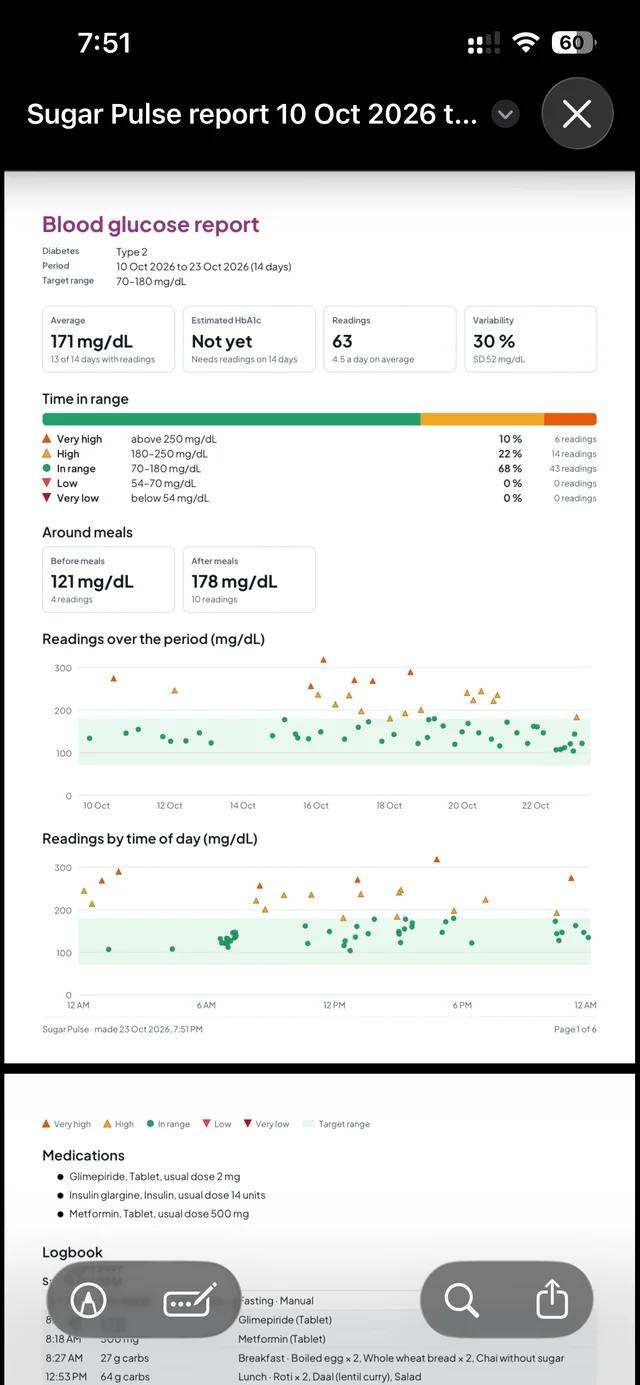
Pick any dates and Sugar Pulse makes a clean PDF on your phone: averages, time in range, estimated HbA1c, charts by date and by time of day, readings around meals, your medicines and the full logbook.
The report is made on your phone and goes only where you send it: WhatsApp, email or the printer.
If your meter has its own app that saves readings to Health Connect on Android or Apple Health on iPhone, Sugar Pulse can bring them in too.


Many people living with diabetes are older or have tired eyes. Every screen in Sugar Pulse is checked in light and dark mode and with very large text.
Follows your phone, or pick one in Settings.
Screens stay tidy with your phone's largest text sizes.
Every status has a word and an arrow, for colour-blind users too.
TalkBack and VoiceOver labels, and spoken summaries of every chart.
Sugar Pulse asks only what it needs to show you what matters. You can change any of it later in Settings.
Type 1, Type 2, gestational, prediabetes, or not sure.
mg/dL or mmol/L, whichever your meter and doctor use.
Start with the common 70–180 mg/dL, or set your own.
Connect it now, or skip and type readings yourself.
Sugar Pulse speaks the standard Bluetooth glucose language used by most connected meters. We mark a model as tested only after pairing and syncing a real one.
| Brand | Models | Status |
|---|---|---|
| Accu-ChekRoche | Instant | Tested with Sugar Pulse |
| Accu-ChekRoche | Guide, Guide Me, Aviva Connect, Performa Connect | Standard Bluetooth |
| ContourAscensia Diabetes Care | Contour Next One, Contour Plus Elite | Standard Bluetooth |
| CareSensi-SENS | CareSens N Premier, CareSens Dual | Standard Bluetooth |
| OneTouchLifeScan | Verio Flex, Verio Reflect, Select Plus Flex | Via Health Connect / Apple Health for now |
| Another brand? | Other meters that use the standard Bluetooth Glucose Profile may work too. | Tell us your meter |
“Standard Bluetooth” models follow the Bluetooth Glucose Profile and are expected to work; we are testing them on real meters. All product names and brands belong to their owners. Their use here shows compatibility only and does not mean endorsement.
We built Sugar Pulse the way we would want our own family's health records treated.
Your readings, meals and medicines are stored on your phone and work without internet.
There are no ads in Sugar Pulse, and we never sell or rent your information.
App analytics and crash reports never include your glucose values, notes or meals.
Reports are made on your phone and shared only when, and with whom, you choose.
No. You can type readings in yourself in a few seconds. A Bluetooth meter just saves you the typing, and you can connect one any time from More.
Yes. Logging, meter sync, insights, reminders and PDF reports all work offline. Your records are stored on your phone. You need internet only to create your account and sign in.
Sugar Pulse supports meters that use the standard Bluetooth Glucose Profile, which most connected meters do. The Accu-Chek Instant is tested; Accu-Chek, Contour and CareSens Bluetooth models are expected to work and are being tested. OneTouch meters use their own protocol, so for now you can bring their readings in through Health Connect or Apple Health. See the meter list.
Yes. Choose mg/dL or mmol/L when you set up, and change it any time in Settings. Your readings are kept either way.
No. Sugar Pulse records the doses you take and reminds you about them, but it never suggests a dose. Please follow the advice of your doctor or care team.
Sugar Pulse is available on Android through Google Play now. The iPhone version is coming soon to the App Store.
Yes. Go to Insights, tap the report button, choose the dates and share the PDF by WhatsApp, email or print it. Your notes are left out unless you choose to include them.
You can ask us to delete your account and the data saved to it from the Contact us page. See the Privacy Policy for details.
Sugar Pulse does not replace medical advice. It helps you keep a record of your readings and understand them. It is not a medical device, does not diagnose or treat any condition and never suggests doses. Always follow the guidance of your doctor or care team, and get urgent help if you feel unwell.
Set up takes a minute. Your first reading takes seconds.